
Client Authentication EKU Deprecation and Its Impact on Avaya Environments
Publicly trusted CAs are phasing out the Client Authentication EKU (Extended Key Usage) from public TLS server certificates from 2025 to mid 2026, driven by the Chrome Root Program requirement that certificates used for public TLS be dedicated to server authentication only by June 2026. Existing certs remain valid until expiry; the changes apply to new issuance, renewals, and reissues after each CA’s cutoff date.
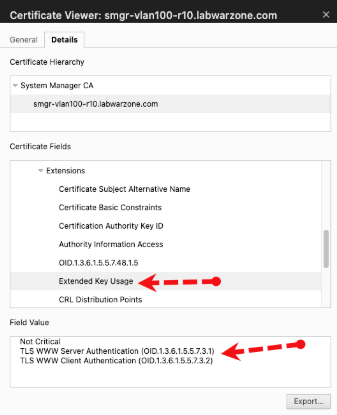
In secure communications, a TLS handshake always involves two roles: a client and a server. The endpoint that initiates the TLS connection acts as the client, while the endpoint that accepts the connection acts as the server. For example, a single interface on an Avaya Session Border Controller often performs both roles. It may initiate outbound TLS connections as a client and accept inbound TLS connections as a server. This dual behavior is why the SBC configuration includes separate TLS client and server profiles.
A certificate extension defines how a certificate can be used. The Client Authentication Extended Key Usage (EKU), identified as clientAuth, specifies that a certificate is intended to authenticate a client during mutual authentication.
In a mutual authentication setup, both the server and the client exchange and validate certificates. This approach is common and often built directly into Avaya configurations such as the secure connection between the SBCE and Session Manager. Mutual authentication can also be used with endpoints, although this is less common.
What does this mean for your Avaya environment? Recent solution articles indicate that these changes are already affecting Avaya deployments. For example, SOLN385552 highlights cases where customers issued internally facing public certificates in which the clientAuth EKU has been removed, resulting in failed TLS connections.
As many certificate authorities (CAs) have noted in their advisories, migrating these use cases to a private PKI is often the path of least resistance. Fortunately, Avaya offers a robust private PKI solution well suited for Avaya environments. That said, it’s important to recognize before issuing new certificates that the private-facing portion of the infrastructure may not function correctly when client authentication (clientAuth) is not enabled, and your public connections can fail if the certificate includes clientAuth within your Avaya environment.